---
title: Styling
description: Theme the palette with CSS variables, restyle it with data attributes, or write every rule yourself.
---
The components ship with no styles of their own. You can theme them in three ways, and mix them.
## 1. The default theme
```ts main.ts
import 'vue-cmdk-palette/style.css'
```
The theme covers the dialog, the inline palette, chips, the detail panel and the footer, in light and dark. You get the dark theme under `prefers-color-scheme: dark` (unless an ancestor has `[data-theme='light']`) and under any `[data-theme='dark']` ancestor. Animations switch off under `prefers-reduced-motion`.
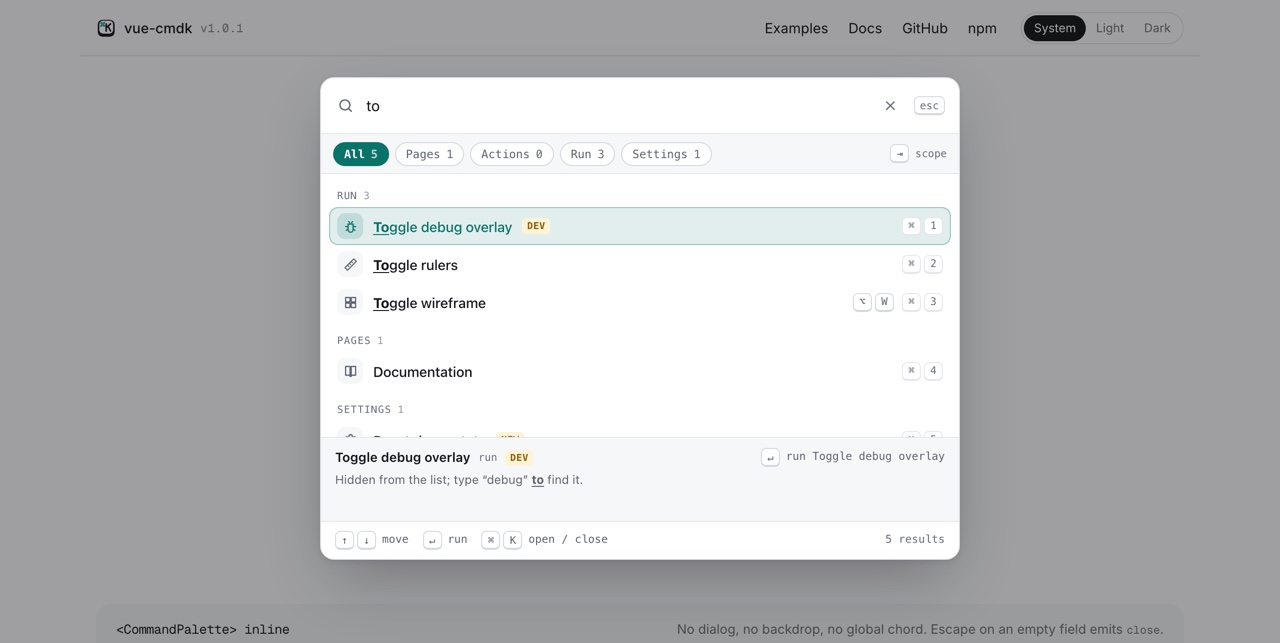 The same palette in the light theme, filtered by 'to'.
## 2. Theme variables
Every color, size and font in the theme is a `--cmdk-*` custom property. Override any of them on `:root`, or on an ancestor of one palette:
```css
:root {
--cmdk-accent: #7c3aed;
--cmdk-width: 720px;
--cmdk-radius: 10px;
}
```
| variable | controls |
| -------------------------------------------------- | ------------------------------------------------- |
| `--cmdk-font`, `--cmdk-font-mono` | Text, and the key caps and headings. |
| `--cmdk-width`, `--cmdk-max-height` | The dialog's size. |
| `--cmdk-top` | The dialog's distance from the top of the window. |
| `--cmdk-radius`, `--cmdk-row-radius` | Corner rounding of the card and the rows. |
| `--cmdk-bg`, `--cmdk-bg-sunken`, `--cmdk-bg-hover` | Surfaces. |
| `--cmdk-fg`, `--cmdk-fg-muted`, `--cmdk-fg-faint` | Text colors, strongest to weakest. |
| `--cmdk-border`, `--cmdk-border-strong` | Dividers and outlines. |
| `--cmdk-accent`, `--cmdk-accent-fg` | The selected row, active chip, and focus marks. |
| `--cmdk-highlight` | The color of matched text. |
| `--cmdk-badge-bg`, `--cmdk-badge-fg` | Badges. |
| `--cmdk-overlay`, `--cmdk-shadow` | The backdrop and the dialog's shadow. |
The dialog is teleported to `body`, so for a dialog, set variables on `:root` or `body` rather than on the component's parent. An inline palette picks them up from any ancestor.
## 3. Data attributes
Every part has a `data-cmdk-*` attribute, and state lives in `data-selected`, `data-disabled` and `data-active`. Write ordinary CSS against them, either on top of the theme or instead of it:
```css
[data-cmdk-item][data-selected='true'] {
color: white;
background: black;
}
[data-cmdk-group-heading]::before {
content: '# ';
}
```
In a component with `
The same palette in the light theme, filtered by 'to'.
## 2. Theme variables
Every color, size and font in the theme is a `--cmdk-*` custom property. Override any of them on `:root`, or on an ancestor of one palette:
```css
:root {
--cmdk-accent: #7c3aed;
--cmdk-width: 720px;
--cmdk-radius: 10px;
}
```
| variable | controls |
| -------------------------------------------------- | ------------------------------------------------- |
| `--cmdk-font`, `--cmdk-font-mono` | Text, and the key caps and headings. |
| `--cmdk-width`, `--cmdk-max-height` | The dialog's size. |
| `--cmdk-top` | The dialog's distance from the top of the window. |
| `--cmdk-radius`, `--cmdk-row-radius` | Corner rounding of the card and the rows. |
| `--cmdk-bg`, `--cmdk-bg-sunken`, `--cmdk-bg-hover` | Surfaces. |
| `--cmdk-fg`, `--cmdk-fg-muted`, `--cmdk-fg-faint` | Text colors, strongest to weakest. |
| `--cmdk-border`, `--cmdk-border-strong` | Dividers and outlines. |
| `--cmdk-accent`, `--cmdk-accent-fg` | The selected row, active chip, and focus marks. |
| `--cmdk-highlight` | The color of matched text. |
| `--cmdk-badge-bg`, `--cmdk-badge-fg` | Badges. |
| `--cmdk-overlay`, `--cmdk-shadow` | The backdrop and the dialog's shadow. |
The dialog is teleported to `body`, so for a dialog, set variables on `:root` or `body` rather than on the component's parent. An inline palette picks them up from any ancestor.
## 3. Data attributes
Every part has a `data-cmdk-*` attribute, and state lives in `data-selected`, `data-disabled` and `data-active`. Write ordinary CSS against them, either on top of the theme or instead of it:
```css
[data-cmdk-item][data-selected='true'] {
color: white;
background: black;
}
[data-cmdk-group-heading]::before {
content: '# ';
}
```
In a component with `